Subscribe

RSS Feed (xml)

Powered By

Skin Design:
Free Blogger Skins

Powered by Blogger

Showing posts with label Nokia. Show all posts

Thursday, May 28, 2009

Nokia 6600i Slide

Custom Search

The Nokia 6600i Slide is an updated version of last year's Nokia 6600 Slide and it is identical in almost every detail except for an upgraded camera and a shiny new case.


Priced at a very reasonable €200 before tax and subsidy, the 6600i Slide offers quite a lot of features for the money. This is a 3G phone with a 2.2" 240 x 320 pixel display, the five megapixel camera has dual flash and autofocus, microSD cards are supported up to a maximum of 16GB, the 6600i Slide supports Bluetooth 2.0 and USB connectivity, there's a fairly standard multimedia player and an FM radio too.

Video recording is either VGA resolution at 15 fps or QVGA resolution at 30 fps. We think this is disappointing for a 5 megapixel camera phone, normally we would expect to see at least 30 fps for VGA video capture.

 Nokia 6600i Slide Software includes a fairly standard set of Series 40 applications, but the 6600i Slide is not a smartphone so choices are a little limited. One novel feature is tap control, so certain applications can be controlled just by tapping the phone.


The standard sales package includes a 1GB microSD card, a stereo wired headset and a data cable in addition to the phone, charger and battery. That offers better value than the old 6600 and it is certainly competitive.

The main drawbacks are that the Nokia 6600i Slide does not support 3.5G data, and owners of the previous model complain of poor battery life and a susceptibility to scratches, especially on the keypad.

Perhaps the biggest problem of all will be finding someone to buy the Nokia 6600i Slide. Despite the mid-market specifications, sales of the old 6600 Slide have been tiny, barely scraping into the top 100 Nokia handsets at Amazon. Yes, the 6600i has a better specification, looks a bit nicer and is slightly cheaper.. but we think that the main problem is that the 6600i is not exactly a very exciting or cheap mobile phone.

Nokia say that the 6600i Slide should be available sometime during the third quarter of 2009 in Silver or Black brushed stainless steel colour schemes.


Nokia 6600i Slide at a glance

Available:

Q3 2009

Network:

GSM 850 / 900 / 1800 / 1900 + 
UMTS 850 / 2100

Data:

GPRS + EDGE + UMTS (3G)

Screen:

2.2", 240 x 320 pixels, 16m colours

Size:

Medium slider
93 x 45 x 14mm / 110 grams

Bluetooth:

Yes

Memory card:

MicroSD

Infra-red:

No

Polyphonic:

Yes

Java:

Yes

GPS:

No

OS:

Series 40

Battery life:

3 hours talk / 14 days standby (3G) 
4 hours talk / 14 days standby (GSM)


Nokia N97

Custom Search


So, guess what Nokia came up with as a follow up for their Nokia 5800 XpressMusic Touchscreen phone? The Nokia N97, a Google G1 phone look-alike that sports a 3.5 inch touchscreen and a slide-out QWERTY keyboard.

Design 

The Nokia N97 looks like a cross between a lot of different phones from the iPhone to the Google G1 Phone to the AT&T Tilt (HTC TyTN II). Up front, the Nokia N97's 3.5 inch screen dominates the whole front of the phone except for the little button on the bottom left side corner which serves as the shortcut key to the N series multimedia applications. The call and end buttons are touch sensitive like ROKR E8. On the top of the Nokia N97 is the 3.5mm headphone jack and the power button. The Nokia N97 is just a tad bit larger and thicker than the iPhone and when you slide out the QWERTY keypad, you're reminded of the HTC TyTN II with it's angled screen. The Nokia N97 feels solid enough to hold though it just feels a bit too large especially if you have small hands. The QWERTY keypad is evenly spaced and you won't have trouble typing nor would you have to worry about pressing two buttons at a time. The buttons are very minimal compared with other QWERTY keypads from HTC or Blackberry. I guess this is to make room for the directional pad on the left side. The sliding mechanism feels solid enough though I'm a bit worried about the hinge that connects the screen and the keypad since it looks thin and breakable.


Features and Performance 


The performance of the Nokia N97 is based purely on the demo version but I have to say I'm quite impressed. It looks like Nokia has fine tuned the Symbian OS to work well with touchscreen. On the Nokia 5800 XpressMusic, you won't get much of the swiping and flicking finger action but they've refined it so that you can get that much out of the Nokia N97. Also, compared with the Nokia 5800 XpressMusic demo version, the Nokia N97 interface is quite fast and responsive. You can barely see any hiccup on the accelerometer transition or when you're navigating the Symbian OS. The user interface on the Nokia N97 is also quite new but is still very user-friendly. Like I said, it's touch optimized and there are a lot of widgets you can play with. The built-in browser also looks promising though I wasn't able to see if it supports YouTube desktop PC version. Scrolling through webpages isn't as smooth and fluid as when you're surfing the Safari Browser on the iPhone but the webpages renders quickly though I don't know if that's because the pages that the person demonstrating the phone is already saved and bookmarked on the phone's memory.


The Nokia N97 also supports TV Out, WiFi, GPS, Bluetooth, GPS, FM radio, and a 5 megapixel camera with Carl Zeiss optics. If the camera on the Nokia N97 is as good as that on the Nokia N95 then I'm sure that the Nokia N97 won't have any problems when it comes to its camera software. The Nokia N97 runs on Quadband GSM networks and supports 3G/HSDPA.

It's just too bad that Nokia decided to go with Resistive touchcreen instead of capacitive like that on the iPhone. I'm sure with a bit of development, they'll be able to come up with a lot of good applications that can make use of capacitive touchscreen.

Outlook 

Hmm, looks like Nokia got it right on their second try. I like the Nokia N97 better than their Nokia 5800 XpressMusic and I hope that they'll be able to incorporate the user interface of the N97 on the 5800 XpressMusic though I highly doubt that since the Nokia N97 is aimed at the high end market while the Nokia 5800 XpressMusic borders on the midrange to high-end phone segment. From the looks of the demo version, the Nokia N97 looks promising enough. It's fast and responsive. I don't know what processor or RAM they've used on this device but I guess they were able to make use of the new Symbian OS. All in all, it looks like the iPhone, Google G1 Phone and the Blackberry Storm has a new competitor to watch out for. And knowing that there are a lot of Nokia fanatics, I think that the Nokia N97 will definitely take a large part of the smartphone market.

Wednesday, May 27, 2009

Nokia N96

Custom Search


First Impressions

Initial impressions of the Nokia N96, despite the hype and expectations are a little underwhelming. Persevere with the handset however, and it's a different story. Function wise, it's an improvement on the N95 in almost every way, and tantalisingly hints at the shape of things to come from the Nseries.

Getting the nice shiny new Nokia N96 out of the box, we pop the installation CD into our PC and get cracking.

The first thoughts that hit you as you weigh the Nokia N96 in your hands are all negative. The plastic back, the understated black and silver design, the fact that it is not a touchscreen, the fact that the interface can be real slow at times, and the expectations which have been set so high because of the clean lines and precision of the N95 experience. How is anything going to be quite so good? It is after all supposed to be the new N95.

Shifting between menus on the screen feels slower than it ought to be, although this may be due to the hard drive size; we are reviewing the 16GB version here, and we have experienced similar slowdown in other handsets when we've upgraded the memory with a microSD card. Still, you'd expect the menus to be a bit slicker than this given the cost of the handset.

Also, the gleaming plastic surfaces, which, whilst rather nice to look at, don't feel terribly durable or solid, and it doesn't feel as though you've got your money's worth. The slide, whilst definite and robust, feels arthritic in comparison to the slide featured on other handsets, such as the one on Sony Ericsson's C905.

Likewise, the little stand mounted on the back, around the camera lens cover is a neat little addition, but it feels a little flimsy; perhaps if it were made from a more durable feeling material, it would be more confidence inspiring. So, initial impressions of the N96, despite the hype and expectations are a little underwhelming.

Persevere with the handset however, and it's a different story. It takes some hours, but by the time you wrap the N96 up to say goodbye to it you have travelled a long way, fallen in love with its ability to handle all kinds of stunning video, and made yourself a promise that you will only EVER have a phone which has access to Ovi web services. Yes, the phone is that good.

Ovi is at the heart of the N96, and although they are not to be confused with one another, because Ovi is available on other handsets, and is of course a portal. The video elements are however well integrated into this handset, more so than the N95 and you come away with the impression that this is first time Ovi has shown itself in the best light.


Getting Started

What's in the Box?
Mains adapter/charger
In-car/cigarette lighter charger
USB cable
TV-Out cable
Remote Control for music player
Headphones

Setting Up

The battery charges in just under an hour, the back comes up very easily and simply clicks back into place with pressure, and the flip-open SIM holder, characteristic of Nokia, is far easier than most to deal with.

As soon as you switched on the phone, you get an immediate text about downloading software for WAP and pre-pay MMS and that went fairly smoothly, however most of my internet connectivity was using my own Wi-Fi router, which it discovered in seconds and just needed the WEP key entered. That obviously led to fairly agreeable downloads speeds.

I never got around to installing the Nokia PC Suite which is supposed to be good for installing more applications and transferring multimedia but that's because I freak out when it says that it will take 500 MB and at least 20 minutes. I press cancel, but it now says "tough I have to finish" or the equivalent, and it still takes 20 minutes just to fail to load the latest update of the Microsoft.Net framework 3.0, tying up my computer for the duration during which time I cannot even get Word to respond so that I can write more of this review. It's irritating, but the applications, once loaded form a bridgehead on the PC for Nokia, which I'm not too sure I want at that price.


The N96 packs in a roomy 2.8" touchscreen, which takes up most of the front panel. With a 240 x 320 pixel resolution, the display is really clear and sharp. Text is legible from most angles, and the screen is nice and bright.

The N96 packs in a roomy 2.8" touchscreen, which takes up most of the front panel. With a 240 x 320 pixel resolution, the display is really clear and sharp. Text is legible from most angles, and the screen is nice and bright. Above the screen are the earpiece and video call camera; cramped below it is a control pad with a large four way navigational pad and central control button, four shortcut keys, two soft keys, the call and end buttons, a menu shortcut and a clear key.

Music fans will appreciate the dedicated shortcut keys, though they seem superfluous considering that the N96 comes with the same four big music keys as its predecessor. Nonetheless, the control keys are well laid out, their function self-evident, while decent backlighting makes them legible in the dark. The two soft keys can be assigned any shortcuts of your choice.

The numerical keypad tells a similar story. It is made up of four thin black panels which hold three keys each, and is coated in the same black lacquer as the rest of the phone. But because the pad is totally flat, it is difficult to feel which key you are pressing. The keys feel stiff and are slow to respond.

There is a new default standby screen which invites you to scroll across from left to right trying things out, first contacts first, then messaging, a cool calendar, where days in which you have an entry have a corner marked.

Nokia traditionalists need not fear; you can easily switch from this new style menu layout to the old school Nokia layout. When you press the menu icon at the bottom of the phone (the one which looks like a 'Repeat' function icon on a CD player, located bottom left) the default screen jumps back into that classic Nokia menu mode and if you've had a Nokia before navigation is obvious from this point – if you haven't it's still pretty straightforward. The call and end keys are large and amply spaced, but the menu key is located so close to the bottom of the front panel, you risk letting the phone slip out of your hand when you reach for it with your thumb.

The next icon is the web, and as soon as you start playing around with this, the N96 comes into its own. There is a link to YouTube in the video bookmarks with a recommendation to upgrade to a better data plan (that is, of course, only if you have a 3G-compatible SIM).

Under web feeds is BBC, ITV web sites Sky sports, CNN, Royal Artist Club, Nokia N-Gage. Widsets, the proprietary Nokia Widget system is also here. Next on Menu is Bluetooth – usual rules apply here.

Next is BBC iPlayer which also appears as a shortcut at the bottom of the screen. The new plastic buttons on the bottom on the phone sometimes need pressing twice we find and it’s not until some time later that we find what buttons are for when the slider goes the other way. Whenever you slide the phone the other way, the N96 changes to a landscape view and gives you new buttons on the other side. In video they come alive and give you fast forward, back, stop and go, and a bar comes up on the screen to give a graphical representation of how far you have forwarded into the video, with a minute count as well.

There is a new key on the front, which goes straight to a video menu, on the N95 this was a button for the music player but you can see why the N96 favours video almost immediately.


Gadgets

a. Camera

The quality of pictures taken with the 5 Megapixel camera on the N96 is definitely worth shouting about. The dedicated camera key on the top of the handset switches the N96 into camera mode and is also used as the shutter button. The viewfinder scales images smoothly when you move the camera around to prevent blurring on your image. Operating the camera is relatively easy; all you do is use the D-pad to change the various settings of the camera. As you would expect, the N96 features the full roster of digital camera benefits, such as white balance and exposure settings. Navigating your way through these settings is handled by a bar menu on the right hand side of the viewfinder.

The quality of pictures taken with the 5 Megapixel camera on the N96 is definitely worth shouting about. The dual LED flash illuminates your subjects well in dim conditions; this plus the autofocus and Carl Zeiss optics equals, sharp, clear and highly detailed images.

It's all very intuitive, and thanks to the easy on screen prompts and sensible positioning of the keys. It has its issues though, with stiff keys rearing their ugly head again.

There's also a dual LED flash that illuminates your subjects well in dim conditions, and is (almost) as effective as any Xenon we've seen. This, when combined with the autofocus and Carl Zeiss optics equals sharp, clear and highly detailed images. Colours are rendered pretty well on the phone's display, albeit with a slight blue tinge. But with so many colour options to choose from, such as negative, vibrant, sepia and black and white, as well as a good range of white balance settings, you can easily touch up your photos before you import them to Photoshop. Macro mode is particularly impressive, capturing small handwriting almost perfectly.

Taking pictures in itself is rather awkward, due to a stiff camera key which is difficult to control. Its location right in the bottom corner of the phone means the phone is liable to wobble when you try to take a picture. Also, the lens is not protected as it’s not sunk into the phone, leaving it vulnerable to scratching.

The photo gallery lets you view your pictures in portrait and landscape mode and you can also zoom into them. You can scroll through your photos manually or view them as a slideshow, in which you can control the direction and also add effects. Scrolling through the photos is quite slow.

The slow interface can make this a bit painful but the N96 does give you handy hints as to what each symbol actually means. Going to photos you have already taken does however take some serious button pressing, which is shameful considering the majority of new handsets (such as the C905) have dedicated shortcut keys for your image gallery. The gallery itself, once you finally get to it, has various options for reviewing your shots. You can view them as a slide show and also share them online with your friends. Unlike the C905 the N96 does not put your shots into monthly order, instead it keeps them in a fairly standard and user intensive order as you have to wade through each snap to get to the shot you want.

Pulling your photos off the N96 onto your computer requires you to install a vast raft of N96 applications to your computer. This is very simple and requires next to no user input whatsoever. Simply insert the disc that comes with the phone and you are well away. However after installation is where your problems may begin. To put it simply, the Nokia photo uploading software is an absolute nightmare. It is incredibly slow and cumbersome to use with very little information for the user to cling to. In the end it is far easier to use Windows to move your photos around.

In conclusion the Nokia N96 does have a fantastic camera but unfortunately it is hamstrung but other factors which actually make using the camera a rather painful and time consuming experience. The combination of sticky keys, bad image gallery and poor PC software really pours cold water on the hot 5 Megapixel camera.


b. Video

The media button takes you to a set of video options, one of which is Mobile TV, I press it hopefully, but since I know this engages the DVB-H chip, I know that it will search in vain in the UK for any (this is currently only available in Oxford and Cambridge).

I get a message saying 'no Live TV available' and wonder if the UK will ever have any in the lifetime of this phone. Probably not, but the streamed iPlayer content seems to more than make up for it.

The N96 supports the old H.263 codecs, the newer H.264 and Windows Media version 9 video at VGA and 30 frames a second with hardware acceleration, and can output to TV in Standard Definition. It also has RealVideo but only at QCIF resolution and Flash video is supported in the browser. It has DRM support for OMA DRM and Windows Media DRM.

I look at video that is stored on the phone already and realise that it can store around 40 hours of video there and another 40 if I buy a MicroSD flash card.

On my version of the handset, there is a BBC Three doc called How to Rob a Bank in 60 Minutes, an episode of the comedy Lead Balloon, Mission Beach USA, and the documentary on Oceans (same episode that I caught on TV the night before). This really is mobile TV, and it looks fantastic.

Concerns that streaming video will not be of a similar quality to downloaded content are swiftly allayed; as soon as I click onto the BBC iPlayer which delivers content this way, I am re-assured. I find that someone has left a 241 MB episode of Top Gear on the phone, so I pop out the kickstand, rest the phone on the desk at the right viewing angle wind it up and watch it go – minutes later, I completely forget that I'm supposed to be writing a review – I'm watching TV!

There is a Mighty Boosh episode and one of Doctor Who, and I've stopped thinking about this as a handset. So far I have called no one, emailed no one, done no work, and have just watched video for 40 minutes. This phone could bring down the western economy on its own.

I tear myself away, and then decide just to watch a few more minutes and find that the N96 has automatically bookmarked on the video up to where I had watched. Neat. I have more TV on this device already than I have on my Sky+; TV on the Nokia N96 is highly watchable.


c. Music Player

The Nokia N96 even sounds good when you're not listening on headphones thanks to the two speakers mounted on the right hand corners of the phone – use the stand on the back of the handset, queue up a playlist, and leave it on a table top and you have your very own mini sound system. Even at maximum volume, songs played on the N96 don't suffer from massive distortion, unless you have the bass turned all the way up.

For me, the audio playback quality on a phone is essential, especially if, as everyone seems to be saying that music phones will eventually replace standalone music players in a few years time. I'm still enamoured with my Creative Zen Vision: M (30GB capacity) which I've had for a couple of years now, and it's still the yardstick by which I measure all; until I come across a phone that can surpass both the audio quality and the storage capacity of the Vision: M, and can sync easily with the various music libraries on my home PC, work PC and my laptop, then I'm going to keep my trusty old Nokia 6300 and my Creative player.

Obviously nothing is going to come close to having 30GB on a phone until at least mid-2009, so I'm just going to concentrate on the sound quality here, which is several notches above the audio performance of the N95 and is pretty decent all things considered. I decided not to use Nokia's own headphones, opting for my own Skullcandy ones – the 3.5mm jack means you can use pretty much whatever set of headphones you want – and the songs I loaded onto the N96 sounded great.

There are six equaliser pre-sets – Default, Bass Booster, Classical, Jazz Pop and Rock – which allow you to fiddle with and edit the sound coming out of the speakers; you can easily create custom presets of your own by selecting 'Options' and going to 'New Preset,' although, obviously, you'll have to have the phone in portrait mode to rename equaliser presets, a minor annoyance, meaning you have to switch back and forth between modes if you want to edit EQ settings and then make use of the four media keys.

Those four media keys – Play/Pause, Stop, Skip Forwards and Skip Back – all depress nicely with a satisfying click, and are lit from behind with a nice light brown glow, and are duplicated on the front of the phone, positioned around the main 5-way directional button. As you'd imagine, the headphone remote control which comes in the box also comes with these four keys along.

The Nokia N96 even sounds good when you're not listening on headphones thanks to the two speakers mounted on the right hand corners of the phone – use the stand on the back of the handset, queue up a playlist, and leave it on a table top and you have your very own mini sound system. Even at maximum volume, songs played on the N96 don't suffer from massive distortion, unless you have the bass turned all the way up.

Whilst the music playback quality is commendable, actually getting tracks onto the N96 proved to be something of a task. Maybe I'm just being stupid and not doing it right, maybe it's because Windows Media Player is considered to generally be a bit rubbish, but as soon as I tried to start loading playlists to the handset for the first time, the phone started to sync my entire music library, even though I had more music that it's 16GB of space could handle.

It did seem to immediately recognise my favourite tracks the ones that has been played the most ('Gareth Brown Says' 'Siberian Khatru' and 'Other Animals Are #1' FYI) which is nice, I suppose, but it's annoying not being able to have any control over this. I didn't even realise it was syncing everything until a message popped up on screen informing me that the memory was full.

Nokia Music Manager comes included on the disc with Nokia PC Suite, allowing you to sort and load tracks this way, and should you do so, you may well avoid the unfortunate syncing issues that I've experienced. I'm not going to bother checking it out though. Why should I? I like using Media Player – why should I have to install two audio file management programs on my computer when my Creative works fine with the one I already have? It's the same reason I've not yet got an iPhone – I don't like iTunes.

If music phone makers are serious about making standalone players obsolete, then connectivity issues such as this are going to have to be ironed out.


d. Games


I downloaded a trial version of THQ's Star Wars romp The Force Unleashed from Nokia's gaming device-turned-portal, N-Gage.

I played this for about 15 minutes, running around, stomping Wookiees, after which I earned a solitary Player Point which goes towards my personal profile. Player profiles are for ranking, so when you're looking for online opponents, you can have a quick gander at their profiles, see how many points they have, allowing you to have some idea of what you're up against.

Nokia really does have a quiet victory here. Its Ovi portal can offer music and games, which no other single hand sized device offers, and now it has all manner of video, but it is the games which takes it ahead of the iPhone.

Sure, the Apple App Store features a lot of games, but they are not so sophisticated as these professional games, and although that will come, right now the maturity of the N-Gage eco system is considerable. These are PlayStation (i.e. PS1) quality games shrunk to a handset, and they work. The positioning of the four action buttons and the D-pad also instantly lend the handset to mobile gaming, another thing that the iPhone, for all its touchscreen goodness, lacks.


6. Connectivity

Browser

The N96 has clearly been designed with web browsing in mind and this is really an area in which the N96 can excel. But, like the camera before it, the web browser is hampered by a clunky interface. But it is not without its novel features. When you first switch on the search function the N96 will ask you how you would like to connect to the internet. If you are in a Wi-Fi zone, you will be asked how you would like to connect to the internet, via the Wi-Fi or via your standard 3G (HSDPA where appropriate) connection.

Navigation through the pages is handled by an onscreen cursor and you click around pages in a similar way to a desktop computer. Page transition is swift and there is even an option to have multiple windows open at the same time. Again the sticky and stiff nature of the N96's keys does add a sense of frustration to proceedings, but this is outweighed by the sheer quality of the screen. Videos watched on YouTube looks sharp with no blurring and the quality of the external speaker is another thing that makes you forget those dreaded keys!

The N96 uses the latest Nokia Series 60 browser that can take in normal HTML pages, so you can browse anywhere, but it's not yet a comfortable experience and you have to tab through links using the central square cursor navigator.

We found that getting out of the browser can be quite tricky sometimes as the Back button can just rotate you through the last few screens. The trick is to go back to an earlier screen and then press Back and it lets you out and back to the main menu, but this is not at all intuitive.

As we said earlier it was not easy to try to set up an Ovi account on the phone because it is a clunky interface. After I have given up and choose to do it through my PC it turns out that the help system had told me to use +44 for a UK phone number. What it meant was use 44 and don't use the plus symbol at all. It is easier on a PC and this just shows why handsets are not going to overtake the PC entirely for some generations.


Conclusion

At around £450 unlocked, and free on most deals for a £35 long term contract, your first impressions of the Nokia N96 with its slightly cheap feeling plastic covers aren't going to be great.

However appearances can be deceiving – the N96 with its iPlayer and YouTube support improves upon the video experience of the N95 and titles from the N-Gage gaming portal work a treat. The 5 Megapixel is as good as, if not better than the N95, and pictures taken on the camera look great on the 2.8" screen.

Friday, March 20, 2009

Nokia N85

Custom Search


What?s new that is popping up in the world of Nokia? Yes it is the Nokia N85 S60 Symbian OS 9.3 smartphone, a review and the phone details of this amazing soon to be Nokia N95 ?replacement?. The new Nokia N85 smartphone is the newest addition in the Nokia portfolio of N-Series Symbian 240×320 pixeled OS 9.3 devices. A sneak review of the Nokia N85 tells me that this dual slider will surely be the phone that will take over the market of the N95 and even the N96 fans. What makes Nokia N85 a real gem is the fact that it has an OLED display which supports up to 16 million colors and provides QVGA videos. At last N85 has the micro usb charging mode which was a much needed feature and Nokia should have introduced this long back, anyway you know what they say? better late than never.

An N-Gage friendly smart phone, the Nokia N85 have several features in its arsenal for sure. If you are from North America or the United States then with its tri band WCDMA built in receptor the Nokia N85 will support all the major WCDMA reception including the 800 Mhz, the widely used 1900 Mhz and the 2100 Mhz. Additionally it supports the GSM based reception of 1800 Mhz which is widely used around Europe, South America, Africa and Asia. Also for all you Aussies mate, well, it supports all the 850 Mhz, 900 Mhz, and 1900Mhz band. This means that with this in your hand you will be totally free if you are using AT&T Wireless, Vodafone, Telstra, Rogers Wireless and any other next generation gsm based 3G internet providers or network carriers. T-Mobile, Cingular or Verizon Wireless might not be the best network if you are using the N85 because of the EDGE connectivity only. Of course it has UMTS, HSDPA, GPRS, EDGE, WAP compatibility, what else can you expect anyway! All major carriers like Airtel, Virgin Mobile, Hutch, Digi, Orange Mobile UK etc are supported as well.

For its phenomenal high end Carl Zeiss based 5 mega pixel Nokia have introduced the slider I guess, thus keeping the lens clean and scratch free at all times which otherwise would have been the case if they were using the kick stand in this one also. As you would expect for such a high end handset, it supports auto focus and there is a dual LED flash to support the high 5 megapixel camera which makes N85 a perfect camera phone also. In low light conditions the video light turns itself on which is vital for capturing video on a cloudy day or deep into the night. The overall casing and the texture is really very robust overall and it seems that Nokia have taken good care this time to prevent fingertip marks on the phone?s body. It supports both Wi-Fi and A2DP based bluetooth connectivity. The quality of the A2DP entirely depends on your headphones, if its stereo or mono really does not matter because N85 supports both of them. Glide it down and the smooth keypad exposes itself from the underneath and overall the keys are quite smooth. So, if you are a hardcore mobile game player or like to chat over in mobile instant messengers and chatrooms then this will ensure that your fingers don?t get strain even after an hour of constant chatting. It comes with micro SD memory card slot which supports up to around 8GB of space and guess what? Nokia provides an 8gb of memory card within the package. It also have the standard music player and FM radio built in so you can easily use it as a music edition phone without being left out from the music freaks like me. Not only that the Nokia N85 is also equipped with a 3.5 mm audio jack port so that you can easily plug and play videos and audios regardless wherever you are. The N-Series 3rd edition OS 9.3 based Nokia N85 is also providing you 70 mb of internal phone based memory which should be enough to install your favorite mobile applications easily and use it to your advantage efficiently.

It also comes with a GPS receiver which is nowadays a standard for S60 smartphones and devices I?ll say. Weighed around 4.5 oz this phone have the following specs in its physical size: 4? x 1.9? by .6? which is quite light weight and not bulky at all. Some Demo and The Nokia N85 is priced at around 665 USD before tax and interest premiums. Yes it is a pricey phone but yes, its worth the price totally.

Nokia 6120 classic

Custom Search


Nokia 6120 classic of the 3110 classic button style and the difference is not great, but in the functional areas on both sides of an increase of S60 cell phone necessary to delete the main menu and C key. Omitted even though ABC still pen-shaped keys give us a screenshot of the subsequent work resulted in a very big trouble, but the 6120 classic but the keys feel very laudable. Although the look is more intensive, but the large contact area can be reduced by mistake, according to the occurrence of errors. 
Nokia 6120 classic side element although more, but the arrangements are in perfect order. The left, we can see the 64-polyphonic speaker with third micro SD (T-Flash) memory card slot, while the right focuses on the volume control button and the camera shortcut keys. The fuselage top, natural Nokia are the key to open the traditional, and at the bottom of 6120c, we can find the standard mini USB data cable, 2.5mm headphone jack and charging port are lined up situation. Remove the rear cover of Nokia 6120 classic is a thing of anything, but its next piece of 890mAh capacity of the BL-5B type lithium-ion battery performance somewhat disappointing. At U.S. evaluation period, to 10 minutes every day to call, send and receive message 20, 5 photographs, listening to music 30 minutes, and evening 24-hour shutdown of the use is not calculated, only barely able to support only two days one night the use of time. 

Nokia E65

Custom Search


In Beijing February 12, 2007 at 16:00 pm Spain's second largest city opened the Barcelona 3GSM 2007 World Congress, Finland giant Nokia introduced its E-Series line of the second wave of business intelligence products. Apart from the combination of epoch-making significance E90 Communicator and the E61 and E62 models upgrade - E61i, there is an elegant design, exquisite workmanship Products - E65. Because it adopted a family in Connaught in mind is not common among the slider form, at the same time Nokia, in its official release also give the "Nokia E65 is now certain in the global markets, while in 2007 the first quarter will be more sales markets. "such a claim and therefore is naturally attracted much attention. Indeed, at this 3GSM 2007 the official closing of the General Assembly less than a month's time, brush into Simplified Chinese ROM Nokia E65 will appear in the parallel market ... ...

The photo shows Nokia's latest slider S60 smartphone E65 Business

Overall impression:

E65 is Nokia E-Series mobile phone business intelligence among the first members of a slider design. Although its release late in the N95, but it has become the third Connaught's mind using Symbian operating system and based on the Series60 platform slider smartphone. Compared to their predecessors, N80, Nokia E65 obvious thinning of the thickness of the airframe, and its measurements is only 105 × 49 × 15.5 mm, weight 115 grams, more conducive to users to carry.

Nokia E90

Custom Search

What can I say; the adventure of Nokia phones in the level of XpressMusic is undefeatable. Now Nokia release its new species of series, this hybrid called Nokia 5800 XpressMusic which definitely has very distinctive design. There is no keypad button that stumbling around on the front. As the substitute, almost the front section is surrounded by wide flat screen (3,2 inches). And, this what I called the truly design of the future cell phone. Very quite true, that this series is match with the stylish user who really want to be a trendsetter.

You can guess that this baby is very light (only 109 gram) and offers a captivated user interface. The user is only touch the button at the screen, and you are the most welcome to exploring feature by feature. Free to use stylus pen, your finger, or just enjoyed the plectrum that similar with guitar pick. Even if you want to watched tons or hundred of your photo collection, just touch and grab.

The concept of this cell its also outstanding, nothing has similar like it. This series definitely want to accommodate many of phone cell freaks. The basic thought is to supporting PLAY (play music, video, and games), SHARING (share video, picture and photo to Flickr and vox, including to give comment to blog or community site, or user location on GPS), TOUCH (to get easier in inputting, accessing kind of media with just one touch, and shortcuting to different features).
So the performance of 5800 is above than the other music phone base. For the example, the memory with capacity 8 GB (equal with 6.000 tracks). Network facility to accessing, 3G or 3.5G is very worthies in downloading song which offered by Nokia with Musica. Or for free, just go to the local hotspot for WI-Fi free.

Exceptional audio quality, no wonder when I listened from its two speakers, the stereo is so banged, the bass very kicked, and the treble sizzled.

But the most important, that the whole operating features which involves music is very friendly, thanks to the new user interface. While the audio controlling, can be arranged by the user freely of graphic equalizer. At last, Nokia 5800 XpressMusic made for give freedom to user in enjoying the music they like with their own way, and of course in perfect sound. With handy look model, I can listen my music every time and everywhere I want. And more exciting, this baby can be set as head unit if I connected into an amplifier of audio system in my computer or car.

The innovation is not just emphasized on music feature. As phone for communicating, this type developed a facility called Contacts Bar. This feature is so exquisite, because it serves the variation of communication through voice, SMS, e-mail, website, blog, until my favorite photo.

The other simplicity that Nokia offers is multimedia feature thorough Media Bar and Shortcut menu at the home screen. Definitely this is 1000 times effective; it can cut accessing steps into just to the significant menus. So imagine this: I can happily enter a feature with just a sec, without any hold-up.

Don't forget, this cell also adopt a screen 3.2 inches that supported by the upgrade Symbian 60. The combination between the features, facilities, user interface, and operating system like this that make Nokia 5800 XpressMusic is more than a phone. So performance is just one click far away or I may say one touch.


4 ways to operating:


1. HAND TOUCH
Just touch it with your favorite finger or toe, tapping the icon menu or swiping file. This way is very effective, while your other hand busy.

2. HAND TOUCH QWERTY
This way is using two fingers by both hands, to accelerate file images browsing.

3. PEN STYLUS
I suggest you to use this pen for typing a message or note.

4. PLECTRUM STYLUS 
I love this one, a pick guitar pen, a very impressive innovation, comfortable and handy to use, and for me very stylish and rocking.

==PROFOUND CONCEPT==

MUSIC:

In the music menu provide Music Library that contains 7 sub menus:
- Artists
- Albums
- Playlists
- All songs
- Pod casts
- Genres
- Composers
User can make their own playlist with their own choice of music. This menu is supported by information about total songs, duration, use and left memory. Equalizer sub menu consist of five presets (bass booster, classical, jazz, pop, rock), but can also be edited with eight different level.

VIDEO:

Video player offers aspect ratio arrangement (stretch and normal). Also, video can be used as assign to contact or as a ring tone. This facility empowered with information about video details (video format, resolution, duration, bitrates, and video size). For volume, just press the screen and shift it like IPod.

GAMES

Race your adrenaline with different level of games. As instances, Global Racing Thunder, played with just follow the exciting track race. While in the Bounce Motion, we can drive and aim the target ball. Those two games using motion censor to create the thrill and new sensation.

SHARE

My activities will be heavily compact with the share online facility. For example, sent my photo to Flickr, or vox. Even give it comment to it. Quite expressive, that I can inform my location, just send location map or favorite places via SMS or Bluetooth.

INPUT

As the methodes above mentioned, Nokia indulgent me with my habitual way to operate a gadget. Each is Alphanumeric which are method to operating keypad. QWERTY keyboard offered in two options: mini QWERTY and full QWERTY. Or I can choose Handwriting, that is very responsive with using stylus or plectrum.

CONTACTS BAR

This bar offers the list of important peoples for me, complete with their data: photo, number, address, e-mail, website, and many more. But the most cool that we can check historical call on every name, great isn't it! And at the bottom has enough space to add some web feed.

PHOTOGRAPHY

Nowadays phone without camera is useless. Camera Menu, not only for took a picture, I can also be creative with editing facility. Some of them are photo cropping, adjustment brightness and contrast so my photo can be magnificent. Also icon, text and effect are available.

So what you're waiting for...Nokia 5800 XpressMusic is an impressive gadget, a really cutting edge innovation. And I tell you with this baby in your hand, you are not just have a phone, but also an absolute privilege. 

Wednesday, March 18, 2009

Nokia E71

Custom Search


So there’s this phone called the Nokia E71 . It magically showed up on our doorstep yesterday (shout out to FedEx Sameday!) and was begging for us to review it. Well, we’re not going to disappoint you. In fact, there will be no disappointment at all as you’ll see in our review. The Nokia E71 has officially entered the ring, and it’s coming out fighting. Spoiler Alert: we love this phone. Full review is after the break!Design:
Obviously this is subjective, but this could really be one of the sexiest damn phones we’ve seen in a very long time. We could do without the tacky pattern on the back battery cover, but we’ll let it slide this time. The entire phone is chrome and while it’s definitely a fingerprint magnet (just have your assistant wipe it down for you) it looks really sharp in person. Everything is proportionate and sort of just works well together. The middle select key actually serves as the notification light, too. So when you have a missed event, the border around the middle key will glow white until you cleared the event, or until the expiration time you set for the notification light expires. It’s a nice touch and a creative way to get rid of the annoying older-fashioned status light. Oh yeah…did we mention this thing is thin? Seriously, we don’t know how they did it. Especially with everything that’s packed in here…man, that BlackBerry Bold is just huge compared to this. Everyone is going to have to step it up after this because as of now, we can’t find one single thing Nokia sacrificed to make the device this thin and compact.
Screen:
There’s a 320×240 screen on the E71 and it looks very sharp. It’s not as bright as the N95, but it’s very clear and easy on the eyes. Screen real estate isn’t a problem at all as we find it more pleasurable to use than an N95. Pictures and video look very detailed and clean. There’s a decent amount of contrast when looking at media, and you’ll especially appreciate the screen during some heavy web browsing.Connectivity:
The world must be changing. Remember when Nokia would hold every single feature above your head and never give you the perfect phone? Well, we’re finally getting past that. We’re not positive if there’s support for the 2100MHz band here, so for now, we’ll assume it doesn’t have it and there will be a US NAM model, and European model. In terms of the hard connectivity specs, you’ve got a quad-band GSM/GPRS/EDGE phone with 850MHz/1900MHz UMTS/HSDPA support, Wi-Fi 802.11 a,b,g, Bluetooth 2.0, and GPS. Like most recent Nokia’s, the GPS is assisted by the network, but fret not because there still is a physical GPS chip in here.
Sound:Like the E61 and E61i before it, the E71 houses a single speaker in the upper left of the phone. It seems louder than the E61 and it’s pretty clear for ringtones and alert sounds. Music sounds fine on it, but it’s not perfect. Bass is seriously lacking and you do get a “tinny” sort of sound. It is very, very loud, though, so you can be sure that alarm is going to get your ass out of bed in the morning.
Email:
What good would an E-Series device be without email? Besides the normal POP3/IMAP supported protocols, Nokia’s Mail For Exchange comes with the device out of the box and is incredibly easy to setup. The handset supports BlackBerry Connect (though we didn’t actually try it) and we’d imagine Goodlink as well. The messaging application had a little bit of a visual makeover, and it’s for the better. Text is extremely readable and emails look great. We’d have loved to see support for HTML email, but oh well.Keyboard:
If there had to be one negative to the E71 (relax, it’s not the end of the world) it’s going to be the keyboard. Again, not a huge deal, but if we had to pick one thing to single out it’s the keyboard and it quite possibly won’t bother you. It did annoy us, though. Think of the physical keys on the E71 the same as the E61, just a lot smaller. They’re also not as squishy which is nice, and they’re pretty easy to press once you get it down. Our issue is, again, Nokia has not learned the basic keyboard layout and we personally can’t stand it. On a normal QWERTY keyboard the letter “z” is not directly under the letter “a”. It’s either under the letter “s” or somewhere in between the two. This makes typing a royal bitch if you’re not looking directly at the keyboard and is totally unnecessary. All they had to do is stick the damn period key in front of the “z” key and all would be well. Again, this might not be a big deal to you if you’re coming from a QWERTY E-Series already, but for us hardcore freaks who bang away constantly on the keyboard, we’d like the normal layout that’s used on basically every other QWERTY phone on the planet. Fix it please, Nokia. The keys have a nice white backlighting which makes them very easy to read. Just like the other models, the actual keys don’t light up, just the letters and symbols which makes for a very clean and sexy look.
Something also interesting is the inclusion of predictive text on here. You might be thinking why you’d ever need predictive text when you’ve got a QWERTY keyboard, but it actually helps more than it gets in the way. It sort of works like how the iPhone does. If you’re typing fast and accidentally misspell a word but keep typing and hit the space bar, it will auto correct and suggest that word for you. It can also save you a good amount of typing time as it will suggest words for you when you are halfway through them and a simple press of the space bar selects the suggested word and keeps you moving.
Expandability:
There’s a microSD card slot right above the microUSB port on the handset, so you should be able to expand the memory of the phone to the largest microSD card you can find. We haven’t checked data transfer speeds to the memory card over USB yet, but we’re assuming it’s on par with the rest of the Nokias.Call quality:
Nokia and call quality go together like ham and burger. Kool-Aid and sugar. The E71 doesn’t disappoint. We’ve had such a pleasurable experience with it that we’ve been calling people randomly just to talk on the phone. In all seriousness, it meets or exceeds what we’ve come to expect and love from Nokia. A phone that excels as a phone, as it should. It actually went toe-to-toe with our BlackBerry Curve in terms of holding onto a signal in low coverage areas. And all you BlackBerry lovers out there know that RIM makes one hell of a cell radio in those things.Battery:
There’s a 1500mAh battery in the E71, and with a full day of heavy use like constant email, phone calls, web browsing, and all around messing with the phone, we’ve still got around 2 bars left. There should be no concern with the battery life here.
Conclusion:We’re at the end of the review, but by now, you’ve seen how impressed we are with the phone. It takes a lot to get us excited but the E71 has done it. This thing, in our opinion, is the best phone Nokia has made to date. That’s a very bold statement, we know. But this really is going to be the phone to beat by a lot of manufacturers. From the design, to the specs, to the size, the feel — it has the entire package. It’s not for everyone, though. Some people prefer a straight up phone like a flip phone, but in terms of a smartphone with a QWERTY keyboard, this takes the cake. It is just striking compared to the shit device the E61 was. It’s ok, we still love y’all that carry the E61, but this puts it to shame. One thing I personally can’t get over is the awesome dimensions of the device. It’s so perfectly thin, yet incredibly comfortable to hold and use. We just hope Nokia doesn’t wait too long to bring this to market as they need to strike now. Like right now. This second. After seeing all of the detailed shots and our

Nokia 6300

Custom Search

When I went back to the first list of review that I had made I felt that they needed some updating. So I have updated my Nokia 6300 review to bring out my experience well with the product.

Looks are Smashing
I have been using this phone for around 2 years now. It has fallen from my hand umpteen numbers of times in that span and needless to say has shown quite good durability! When I bought this phone little did I know about making the most out of multimedia features of this phone. But its user-friendly interface taught me everything well in a short span of time. The very first thing that lures you about this phone is its attractive, sleek and stylish metallic body. I was once travelling in a train and my fellow passenger had this phone. It made such an impression on me that I decided to go for this one. Considered as the sleekest phone from Nokia it really adds to your style statement. When I had bought this phone it was available only in stainless steel color but now other color options are also available ranging from Crimson red, to Black

Display
The display of this phone is larger than the other phones which is yet another added advantage. The display is simply awesome and all the colors are displayed well and brightness is just apt. The top of the phone has a button which is used to switch the phone on or change the profile. A volume button is located at the right sidebar of the phone. The volume button also does the work of PTP ie Push To Talk. On the lower side the microphone, battery charger and the insertion point for headset is provided. Keys can be easily pressed unlike certain phones wherein keys are so tightly allocated that it becomes hard to press a certain key! Also on the side bars a blue light flashes continuously if you have missed any call or have a message or other notifications. The user friendly menu icons can be arranged in the order that suits you the most.

Memory and Data Transfer
The phone has an internal memory of around 7-8 MB. This could have been improved but the phone is also equipped with an expandable memory of 2 GB. I currently use a 1 GB memory card and it is sufficient for me to store all the necessary and entertainment stuff that I want. One thing I really like about the phone is that I can move my messages to a certain different folder named saved messages from the inbox. The saved messages folder is located in the phone memory and under this folder I have created many other folders to store my messages as per category viz funny, sentimental etc… The phone allows data transfer through Bluetooth, USB data cable but infrared is not provided. The data transfer is fast and efficient and when connected to PC can be done by simple drag-n-drop method. I always like to download different themes, ringtones and other fun stuff for my phone from the internet. The Bluetooth data transfer is also quite fast and if you are transferring from other Nokia phone then it really occurs faster compared to other models.

Photos, Videos and Camera
The phone is provided with a 2 Mega Pixel camera that takes good quality photos. The camera is provided with 8X zoom but I prefer not to zoom my photos as that destroys the picture quality. The camera does not have a flash so the night mode pics are below average. Moreover it takes time for the camera to adjust as per the night scenario so that you’ll have to wait before you click the pic in the night mode. The images and videos that are captured are directly transferred to memory card. Otherwise I just love clicking photos from the phone in the day light as the photos are quite clear! You can even take photos in different modes like grayscale that allows you to take black and white photos, false colors etc… All the specification can be easily changed even the image preview time.

Music
I love playing songs on this phone. They are very clear. The loudspeaker however is not very loud but the sound through headset is really good. You can play the songs directly from their location or through media player. FM also has good reception and you can store many stations of your choice. Plying the song through media player provides the advantage that you can do other jobs as well and the song will run in the background. When you add new songs to the phone do update the media library to get the updated listing.

Other specifications
The internet access speed of the phone is quite low so I prefer to refrain from using it. Else you can read email access web through this phone.
The phone is provided with a leather case that looks perfect for the phone. However the case causes scratches on the lower part of the body.
I like to add smiley to my messages and the phone really provides certain well graphical smiley for the phone that I love text messaging. However the smiley are not animated that might be disappoint you but nevertheless now I know very well to express my emotions through messages. 
The flaw that really needs to be looked after is the battery back-up of the phone. It only has 3.5 hours of battery back up that is very disappointing. For long journeys I would not prefer this phone if you cannot charge the phone on the way. Also if you talk on the phone for more than 15-20 minutes it becomes hotter. So it is not suitable for long duration calls. 
Playing games is a pleasure on this phone. I had downloaded Age of Empires III on the phone and the graphics are very clear! Also I downloaded certain other games from which are really a pleasure to play on the phone.

When I had purchased this phone it was priced at Rs. 8600 that amounts to around $175 but now it is available at around Rs. 6800 that is around $135. So it is a phone that doesn’t burn a whole in your pocket.

Key Features:-
->2 MP camera takes good quality photographs but not good for use at night
->Display is awesome you'll love it.
->SMS has good smileys. ^_^
->Video quality is low and doesn't take good videos.
->Data transfer through bluetooth and USB cable.
->Very low battery back up. The phone also becomes hot after around 15-20 minutes of talking. Not suitable for long duration calls.
->The cover that is provided with the phone causes scratches on the lower part of the body of the phone.
Overall the phone has both some good features and some bad ones. But it is a stylish phone that attracts the onlookers by its looks.

Nokia 5310

Custom Search


NOKIA ~ 5310 ~ EXPRESS ~ MUSIC ~ Nokia has given us a fantastic phone ...

A phone which expresses music so beautifully , the phone has all the facilities required by a person and its design is perfect .... some information on its desing IS:
Nokia doesn't blindly follow trends, so it wasn't surprising that the company didn't rush to copy the thin-phone success of the now-ancient Motorola Razr. But with the eye-catching 5310, Nokia is giving slim design a go. And we can report it comes together quite nicely. At 4.1 inches by 1.8 inches by 0.41 inch, the 5310 is the trimmest Nokia we've seen, if not one of the thinnest phones ever. It is a world's difference from the relatively bulky 5300 and 5700 Xpress Music handsets; in fact, if it weren't for the external music controls on all three models, you wouldn't know that they're related. We're not afraid to admit that the 5310 is one stylish, even sexy, cell phone. 
The 5310's 2-inch display supports a full 16.7 million colors. It's a brilliant display by all accounts, with rich graphics and sharp text. The default font size may be a bit small for some users but you can change the size and the font color. The 5310 uses Nokia's Series 40, third-edition user interface. The menus are user-friendly, even if the main feature icons are somewhat dull.

Below the display is the easy-to-use navigation array. The square toggle is raised above the surface of the phone, so it's tactile. You can set it to act as a shortcut to four user-defined features, while the center of the toggle functions as an OK button. You'll also find two soft keys and the Talk and End buttons. These controls are flush, but they're also fairly big. Like many Nokia phones, the 5310 lacks a dedicated back button.

As this phone has fantastic design , it also has good feature ......
Some information on its features IS:
The 5310 offers a solid midrange feature set with an emphasis on music. The phone book holds a healthy 2,000 contacts with room in each entry for five phone numbers, an e-mail address, a URL, a company name and job title, a formal name and nickname, a street address, a birthday, and notes. You can organize contacts into groups or you can pair them with a picture and one of 28 polyphonic ringtones. Other essentials include a vibrate mode, text and multimedia messaging alarm clock, a calendar, a to-do list, a notepad, a calculator, a countdown timer, and a stopwatch.

Though the 5310 is far from being a smartphone, it offers a few work-friendly features. There's full Bluetooth with a stereo profile, PC syncing, a voice recorder, a world clock, a unit converter, and instant messaging. E-mail is onboard as well, but only for POP3 accounts such as Yahoo and AOL. Also, you must log onto the Web browser to access your messages. It's not the slickest experience, but it works in a pinch.

As this phone is perfect .... intelligent people like perfect things so you will definately like this phone and you will buy it ...........

Nokia N95

Custom Search


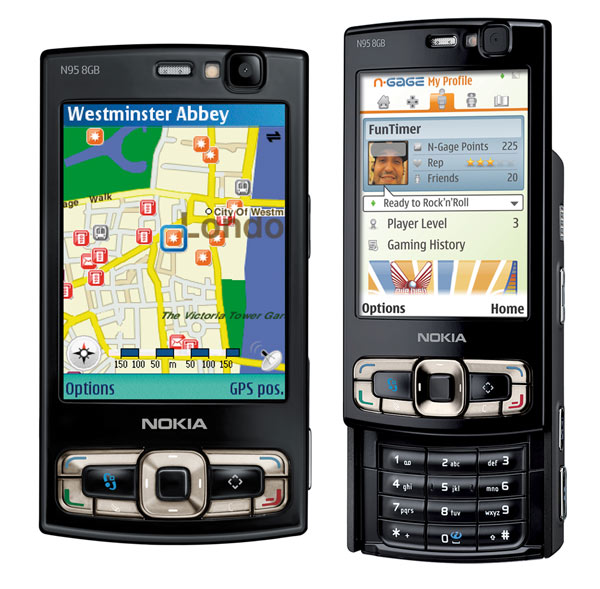
Distance from August 29, 2007 released just two months, Nokia N95 8GB appeared in front of us, this flagship model at the end of the basic N95 memory capacity will increase to 8GB, screen size increased to 2.8 inches. Well, customer care software features point? Now for me to share this with U.S. mobile phone!
  • Standby interface, the main menu: 
    N95 8GB and N95 Standby screen aligned, by default, show the expedited procedures of seven three lines of custom icons and desktop items (separately are the search network or mobile phone, calendar items and WLAN state), in addition to the corresponding softkey about the rapid start-up mode. They established their own shortcuts can be changed, maintained a S60 smartphone powerful flexibility and ease of use. 
    N95 8GB and the N95's main menu is not large compared to the difference, from the Zodiac icon grid we will be able to see it a number of excellent new features, such as "N-GAGE Games" and "video center." These features, we will at a later article in the 11 years.
  • Telephone information: 
    N95 8GB of the phone book storage are forms of shared system memory, so users need not worry about the basic problem of insufficient capacity. Specific to each contact there is a wealth of options, even including the Internet, telephone numbers and PTT number, and items can also be added by the user on its own, the name of each item can also be customized. 
    In addition to storing all of the 20 missed calls, dialed calls and have records to answer the phone, the N95 8GB users can also at the "Tools" menu, see "Communication Record" program, where N95 8GB has a detailed record of the communication situation : message, and packet data, including statistics. 
    In the message area, N95 8GB and traditional Symbian9.2 S60 third edition FP1 smartphone is very similar to support the short message, MMS, e-mail, information services and broadcasting information. Enter the law does not support phrase input, each has to leave a phonetic optional association of words and character input speed is still quite good.
  • Multimedia interface, music player software: 
    Directly press the joystick right side of the "Multimedia" key will be able to enter the N95 8GB multimedia menu, from here on N95 8GB can view all the multimedia materials, including games, music, maps, photos and video and so on. Compared with the N95, the interface more beautiful, especially when switching dynamic, on behalf of the current mobile UI (user interface) design direction of development. 
    N95 8GB music player software functions very well, support background playback, random playback, repeat playback, and a variety of equalizer presets. There are other aspects of the balance adjustment, loud, stereo expansion switch, can also display album art and three other visual effects. N95 8GB has a song arrangement: According to a playlist, by artist, by album, by genre, by composers. In addition N95 8GB also supports the currently popular podcast features, radio and music stores to meet the needs of different groups of people. 
    N95 8GB bundled AD-54-by-wire and the HS-45 stereo headset, the wire can be easily carried out to adjust the volume, play and change music and voice calls and other functions, are essential for N95 8GB entertainment accessories, users can self - AD-54-by-wire at the 3.5 mm headphone jack on inserting their own high-quality headphones.
  • N-Gage Game: 
    Click on the main menu under the "Games" icon, and after a brilliant cross field animation, you can enter the N95 8GB features some of the Games, N-Gage has from previous Games Mobile series turned into a gaming platform, in addition to the current has been listed on N81, N81 8GB, the future S60 models will be more support for the platform. 
    N95 8GB built-in two games demo version, namely the United States are the company's FIFA 07 Electronic Arts and Gameloft racing game ASPHALT 3, will soon have more new N-Gage games to launch, when the Nokia N95 8GB entertainment will further improve performance.
  • Video player and other entertainment features: 
    N95 8GB, as usual, built-RealPlayer, support MP4, 3GP and RM format video player, the player can press the number keys "2" for full-screen playback. At N95 8GB 2.8-inch LCD screen, but also Nokia N Series mobile phone has always been the maximum size screen to watch video, or there is a considerable feeling.
  • Flash, 3D ring tones: 
    Nokia N95 8GB built-in Adobe Flash Lite 2.1 version to support Flash Player files. 
    N95 8GB retains the N73 at first appeared on the three-dimensional ring tones, ring tones are all over the place in a variety of circumstances, allows users to ring in the usual manner on personalized rings showed unusual results.
  • Office tools: 
    In the office software, N95 8GB is still built QuickOffice (version 3.8.12.0) and Adobe PDF (version 1.5.0), can open and edit doc, xls and ppt format documents, and pdf documents to support browsing. In addition N95 8GB also has a unit conversion, two-dimensional code recognition, Notepad, two-way dictionary and Zip Manager and other commonly used instrument.
  • GPS functions: 
    Following the N95 and E90, 6110 Navigator after, N95 8GB, Nokia has become the fourth mobile phone built-in GPS chips, but like the N95 8GB and N95, are not used on the 6110 Navigator navigation software Route 66, N95 8GB not N95 just listing do not support A-GPS, the first edition version of the software has built-in A-GPS function, positioning of the Express has a great help. N95 8GB but also because now there is no licensed version of its GPS functionality, we could not conduct further tests.
  • It features: 
    N95 8GB are still using a powerful 500-megapixel Carl Zeiss Tessar Series cameras support auto focus, which is currently the highest standards of Nokia mobile phone, long press the right side of the fuselage beneath the camera shortcut keys will be able to enter the N95's camera interface, N95 8GB camera parameter adjustment quite intuitive, specific settings can we watch the following screenshot:
  • Network functions: 
    Nokia N95 8GB excellent multimedia performance and Internet Web 2.0 combined with time, it led to a considerable amount of Internet-sharing function: apart from that we have just mentioned podcasts, at "Video Center" menu, there are network video, Nokia N Series Video, etc. and the Internet combined with the close of the video menu, respectively, can subscribe to video and download the latest Nokia N Series Video. 
    In the application menu, there is "Lifestyle" and "line sharing" and other procedures used to separately own photos and videos, as well as the process of using machines uploaded to Nokia Lifeblog and the famous, such as Flickr and VOX shared on web .
  • My view: 
    As a classic model of the upgraded version of N95, Nokia N95 8GB First, under the appearance of black fur, apart from Massive 8GB storage space, the software interface part has been not a small change, should be able to get more consumers. Nokia N95 8GB as this year's flagship model and land clearance for the performance of an extremely good job. 

Nokia N82

Custom Search

Nokia has introduced a couple of new software additions in the past few months for various Nokia mobile phones. Remember for example the Nokia Ovi Internet browser and the new NGage games. Besides these new software additions, the N82 has also been equipped with an integrated GPS receiver, navigation software and a five Megapixel digital camera with Xenon flash. The N82's digital camera is able to exceed any other camera phone with ease thanks to its superior image quality, speed and user-friendliness. The Nokia N82 can even serve as a substitute for a normal digital camera. We must admit we have heard these words before and so far this promise has not been fulfilled yet. But looking at the specifications of the Nokia N82, it is at least a very promising and enhanced handset. Nokia awaken some high expectations here and the question is; can Nokia live up to these expectations? How well the Nokia N82 performed can be read in the LetsGoMobile Nokia N82 review.

-Nokia N82 Phone design-
Nokia decided to go for the candybar design. It makes the N82 rather big though. The N82's housing is entirely made of plastic and to me it doesn't feel too solid. Still the Nokia N82 has a perfect hand-fit for calling as well as photographing. The buttons of the Nokia N-82 are a bit on the small side which makes it hard to quickly dial a number. The function buttons on the other hand are of a better size hence the easier operation. The camera lens is covered by a small plastic cover that has to be opened manually

-Nokia N82 Battery
The Nokia N82 has been equipped with a 3.7 Volt 1050mAh battery. The BP-6MT battery has a standby time of 225 hours and a talk-time of more than four hours according to the specifications. It also offers taking around 290 pictures and 10 hours of non-stop listening to music. The times indicated by Nokia are similar to the times we measured in practice. However, when a combination of functions is used these times will alter. If you plan to use these functions a lot, you might want to purchase an extra battery. 

Nokia N73

Custom Search


I bought N73 2 months ago and have been very satisfied so far. I am a designer as well as a tech-savvy person, so a good design style and excellent features is a must!! Besides the ease of use, the best camera phone anyone could have with carl zeiss optic, 3.2 megapixel. I've only got some minor complaints so far, which is the poor alarm setup. You have to resetup the alarm everyday. Usually, a good mobile phones nowadays have a smart alarm system where it can programmed itself according to the user's setup. I don't use this feature much, but for those who use this feature much might want to recondsider to get another phone. Another minor complaint of mine is N73 often lagging when the memory's almost full. But you can always solve this by getting a bigger memory card. Other than that, this phone is great!!
 
if(toolbar) { var theButton = document.createElement('input'); theButton.type = 'button'; theButton.value = ''; theButton.onclick = ; theButton.className = 'ed_button'; theButton.title = ""; theButton.id = ""; toolbar.appendChild(theButton); }